
Class 12 Notes
(notes are in progress and are subject to change)
|
|
|
Introduction:
Objectives (Skills 3&6):
<Log On>
Discourse
Minimize Discourse
NOTE: update personal grade spreadsheets
NOTE: Useful technique to locate a term in a long document - keyboard command, -F (CMD-F on a Macintosh).
Chris Nolan - Searching the Internet
Topics from Mr. Nolan's Presentation
Finding Better Information on the Web (link for IE)
Alternate Link (works better with Firefox and Safari)
Searching the Internet using a Search Engine
Directories (Subject Lists) for Academic Searches
What the url can tell you:
Structure of url:
http://www.lib.berkeley.edu/TeachingLib/Guides/Internet/FindInfo.html

Practice truncating urls:
Digital Photography - http://cel.colgate.edu/howto/digital-photo.htm
Truncate class URL - http://www.cs.trinity.edu/~jbelisle/cs1300/Topics/Syllabus/Syllabus.html
Homework:
Part 1:
Make a blog entry about what you learned from Chris Nolan's presentation - describe something new that you found out and something that surprised you.
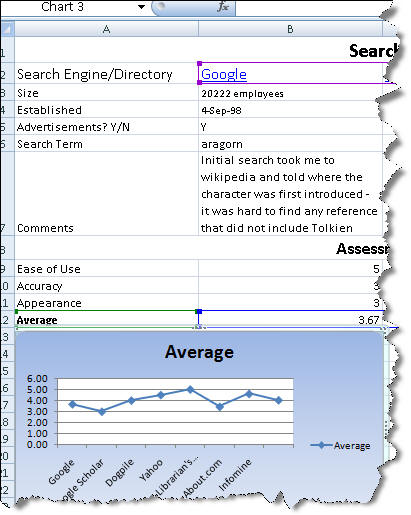
Part 2: Create an Excel
spreadsheet that compares search engines and directories. Follow the directions
in the directions document and on the spreadsheet called WebSearch in the
12search folder.
Pay attention to the date of the information -
http://www.webreference.com/authoring/seo_facts/
The example below shows only a partial portion of the assignment.
<Log Off>