
Class 18 Notes
(notes are in progress and are subject to change)
|
|
|
Objectives:
<Log On>
Discourse
Minimize Discourse
Copy 18animation from Class to shared (groups) folder
Check to see that your presentation is in the right folder with the correct name.
Show good student PPTS - Archive Folder, Class
Timings and Advanced Effects in Power Point: Build PPT called One World in class (Tip from the readings - "Substitute emotionally intense visual images for dry bullet points")
- Special Effects (see Stacked folder in 18animation)
- Transition effects
- Stacking images
- Custom Animations - shapes and paths
- Adding and timing sounds and video
- Timing slides in Slide Show menu
Hands-on: How to Put a You Tube Video into PowerPoint 2007
Hands-on: Animating a GIF File Using Photoshop Elements 6
Tools - Optional
NOTE: We will start this activity only if there is time. It is not due for homework.
Presentation Banners in Photoshop Elements
Open PSE and set up a new document that is 600 pixels wide and 300 pixels deep. Make the background transparent and the color mode RGB.
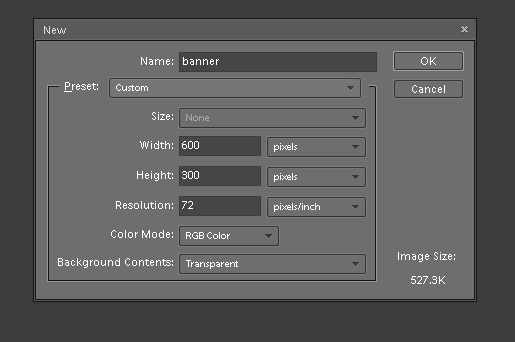
Optional: Using the photos in the Trinity folder inside 18animation, practice using layers and opacities (see Making a Web Graphic with PSE and Layers). Make a new layer before you begin adding multiple images. You may save this banner as a jpeg and as a Photoshop file inside the 18animation folder.
HOMEWORK: Complete on Power Point presentation and be ready to present it on Thursday. See Presentation Guidelines
Be prepared to make a two minute presentation of your topic on Thursday, March 26th.
36 points
<Log Off>