 |
Class 1 Notes
(notes are in progress and are subject to
change)
|
Introduction:
(materials: class roll, text)
(display class web page, turn off fluorescent light and turn on dim lights,
take student computers)
Please turn off cell phones
and put them
out of sight
Objectives:
- Understand the course content, requirements, and procedures.
- Be able to set up and update weblog on Blogger.
- Use Trinity email
to email TA
State Course, Times, Instructor, Roll Sheet
Introduce TAs
What are the rules of conduct
for class?
The following behaviors are distracting to others and can be
disruptive:
- using the computer for
playing games
- surfing the Internet
when such surfing is not part of the class lesson
- checking email
- using a cell phone
- watching television
over the Internet
- listening to music or
other unauthorized audio
- doing homework that is
past due (especially blog entries), or doing work
for another class.
Power Point - History of Course and Skills Test
Synchroneyes: Take/Project Student Screens
Syllabus and Course Outline
Grading:
Blackboard
Structure of Class Web Page - show where notes can
be found:
What to
Look For: Notes/Topics/Hands-On/Readings&Assignments
Navigating to the Class Web Page and Creating
Bookmark on Tiger's Lair
- url: http://www.cs.trinity.edu/~jbelisle/cs1300
- How to create Bookmark on Tiger's Lair
- Logon Tiger's Lair
- My Bookmarks on bottom right hand side
- Add Bookmark

Class Communication and Collaboration
Tools - Blogs and Wikis
CS1300
Wiki - password is tigers1300/practice edit
Click through
blogs from Spring 2008
Explain homework assignment and sticky notes
PDF:
Setting up a Blog using Blogger
Screen Shots from Ms. McCollum -
Setting Up Your Blog
Blog Set-up (see assignment link from home page)
- see links from home page
- write on post-it note
- username for blog (use your TU
email address - see instructions in 1blog assignment)
- interesting fact for scavenger hunt
(not sports)
- put your name on the sticky
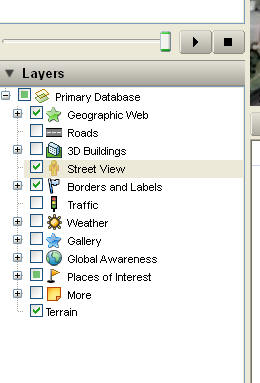
Google Earth - Fly Home (or to a favorite place)
Street View
***Homework for
Tuesday -
CLICK HERE for directions
Assignments
(also see right column on Home Page)
Hands on:
- Make Bookmark
- See link to 1blog on home page -
follow the directions for the blog entry and the email to the TA. Both must be
completed by the beginning of the next class in order to receive credit.
- "Fly" with Google Earth
- send location to yourself so you will have the URL
Outside of Class:
- Be familiar with information on
syllabus.
- Browse Computer Policies on
links shown on the homepage looking for answers to the Reading Hints at end of
class notes, below. The answers will not be turned in.
- Select a computer next class.
------------
Reading Hints:
- Be familiar with information on
syllabus.
- Code of Ethics for Computing
- Be aware of violations
- Relevant facts about copying software
- Section with questions and answers (be able to
answer the questions)
- Know the difference between shareware and public
domain software and copyright restrictions
- Code of Ethics for Electronic Mail and Voice Mail
- Section A. Be aware of violations in this
section.
- What are chain letters? You can get
information about chain letters and chain email from the Internet.
Logoff
- Close all applications
- Start=>Shut Down=>Log off
(choose this from pull down menu)