
Class 22 Notes
(notes are in progress and are subject to change)
|
|
|
Discourse
Minimize Discourse
TAs - please put postcards into folders inside Groups
Making a Photo Album Slide Show Using Power Point
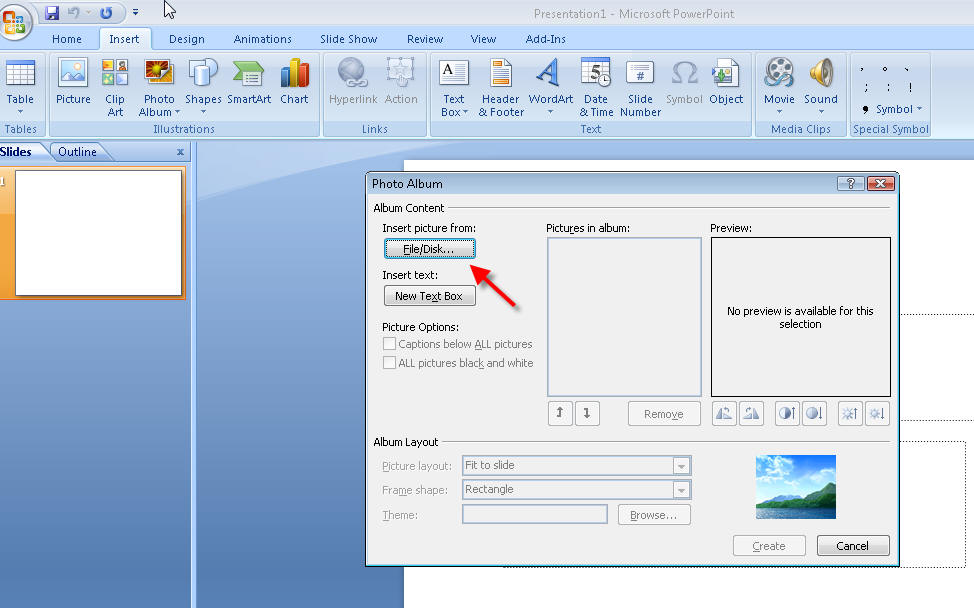
Copy 22bones from Class to your shared folder.
Download Expression Web from the Microsoft folder in the S Drive:
S:\Microsoft\Expression Web
Introduction to HTML
Rt. click inside 22bones - New>text document
Save file as bones.htm inside 22bones
(it is very important to change the file extension from .txt to .htm)
Open IE and browse to file
Change, refresh, compare
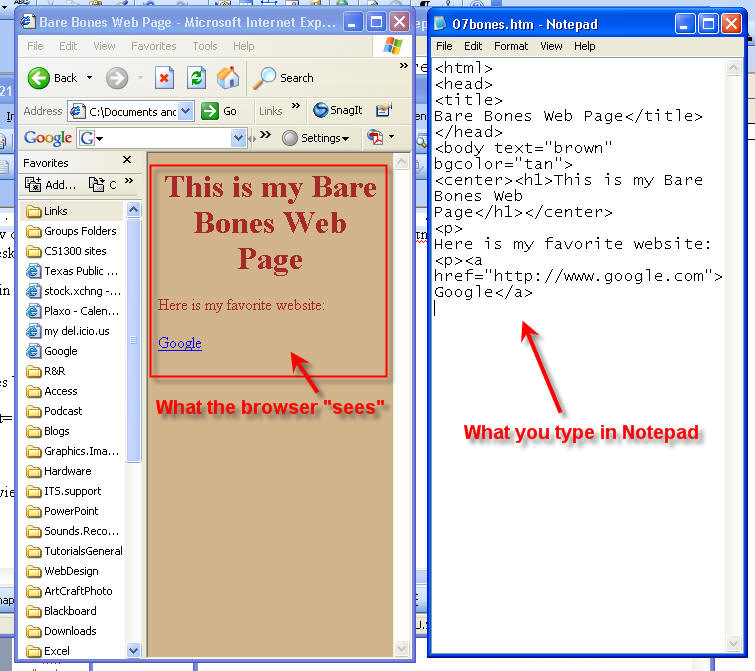
Bare Bones:
<html>
<head>
<title>
Bare Bones Web Page</title>
</head>
<body text="brown" bgcolor="tan">
<center><h1>This is my Bare Bones Web Page</h1></center>
<p>
Here is my favorite website:
<p>
<a href="http://www.google.com">Google</a>
<p>
<a href="http://www.trinity.edu">Trinity University</a>
<p>Here is a picture of my cat.
<p>
<IMG src="cat.jpg">
<p>
<ol>
<li>
Cat food</li>
<li>Fake mouse</li>
<li>Catnip</li></ol>
<p>
<table border=1>
<tr><td>One Fish</td><td>Two Fish</td><tr>
<td>
Red Fish</td><td>Blue Fish</td></tr>

Ordered Lists
Unordered Lists
There are 16 color names that you can use: aqua, black, blue, fuchsia, gray, green, lime, maroon, navy, olive, purple, red, silver, teal, white, and yellow. If you want to use other colors, you must specify their RGB or HEX value.
HTML tags that you should know how to use:
<html>...</html>
<head>...</head>
<title>...</title>
<body>...</body>
<p>...</p>
<br>
<b>...</b>
<i>...</i>
<center>...</center>
<u>...</u>
<b>...</b>
<h1>...</h1>
<h2>...</h2>
<h3>...</h3>
<h4>...</h4>
<h5>...</h5>
<h6>...</h6>
<hr>
<img src = "cat.jpg">
<a href="http://www.trinity.edu">Trinity University</a>.
<ul>
<li>...</li>
<li>...</li>
<li>...</li>
</ul>
use <ol> above in place of <ul> above
Know about table tags.
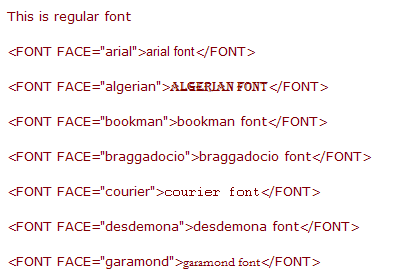
Changing fonts:
Webpage colors using hexadecimal codes.

<BODY BGCOLOR="#D8BFD8">
 When you create a graphic for the web, you choose your colors based upon their
RGB values. However, HTML will only recognize a color by its
hexadecimal equivalent of the RGB values or by its color name,
if it has one. Even though most HTML editors and graphics programs have RGB to
hexadecimal conversion capability built into them, it might still be helpful to
know how it works.
When you create a graphic for the web, you choose your colors based upon their
RGB values. However, HTML will only recognize a color by its
hexadecimal equivalent of the RGB values or by its color name,
if it has one. Even though most HTML editors and graphics programs have RGB to
hexadecimal conversion capability built into them, it might still be helpful to
know how it works.
Hexadecimal numbering system:
0 1 2 3 4 5 6 7 8 9 A B C D E F
Colors (web safe) are specified by 00 33 66 99 CC FF
Hexadecimal colors - a quick explanation
Browser-safe colors (FYI - Photoshop Elements can be set to show only browser-safe colors)
Homework:
Add two new links to your bare bones page. Change the background color. Add one item to the list of things the cat likes. Save and preview in browser.
<<log off>>