
Class 26 Notes
(notes are in progress and are subject to change)
|
|
|
<Log On>
Discourse
Minimize Discourse
(Reminder: Course Evaluation at the end of class)
Computer Slide Show in Power Point
Changing the File Name of Your Home Page
Work in Class on Web Site - Q&A
Mac Users:
Publish Web on Sol:
For safety, backup your Web in your shared folder onto your Y drive.
Open your HTML-Documents folder on Sol and copy and paste the folders and files from inside your Web folder (25myweb). The page named index.htm is your home page.
To open your HTML-Documents folder:
start >> run>> \\sol.cs.trinity.edu\userid\Local\HTML-Documents (substitute your own userid)
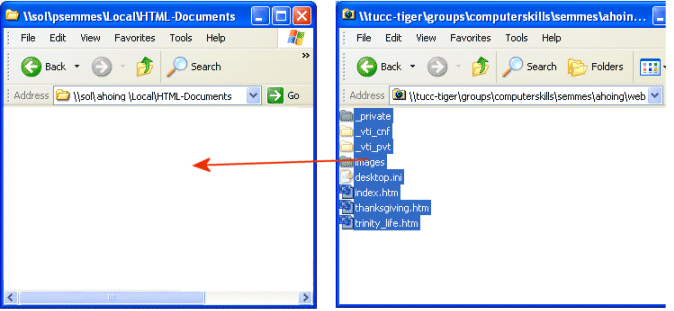
url: http://www.cs.trinity.edu/~userid
Publish Web on Sol and view Webs on Internet.
Check title that appears on title bar on each page.
Have someone else browse to your web and check for broken links and images.
Unpublish Web on Sol (if you ever need to):
Delete the files in your HTML-Documents folder in your Sol account.