 |
Class 1
Notes are in progress and are subject to change
|
Introduction:
(materials: class roll, text, class web page)
Please turn off cell phones
and put them
out of sight
Objectives:
- Understand the course content, requirements, and procedures.
- Be able to set up and update weblog on Blogger
- Set up social bookmarking site on delicious.
- Use Trinity email
to email TA
Part One: Introducing the Course:
- State Course, Times, Instructor, Roll Sheet
- Introduce TAs
-
Power Point - History of Course and Skills Test
- SynchronEyes:
Take/Project Student Screens
- Syllabus and Course Outline
- Grading:
TLearn
- Structure of Class Web Page - show where notes can
be found:
-
http://www.cs.trinity.edu/~jbelisle/cs1300
-
What to
Look For: Notes/Topics/Hands-On/Readings&Assignments
Part Two: Hands On
We will give this a try:
Navigating to the Class Web Page and Creating
Bookmark on Tiger's Lair
- url: http://www.cs.trinity.edu/~jbelisle/cs1300
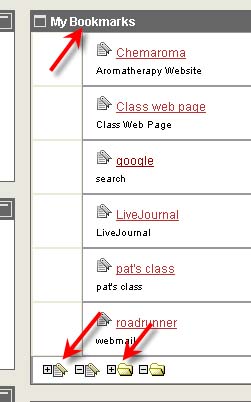
- How to create Bookmark on Tiger's Lair
- Logon Tiger's Lair
- My Bookmarks on bottom right hand side
- Add Bookmark
-
-
Keep, share, and discover the best of the Web using
Delicious, the world's leading social
bookmarking service.
|
Class Communication and Collaboration
Tools - Blogs
Click through
blogs from Fall 2009
Explain homework assignment and sticky notes
Making a Weblog
for this class - guidelines
Screen Shots from Ms. McCollum -
Setting Up Your Blog
Blog Set-up (see assignment link from home page)
- see links from home page
- write on post-it note
- username for blog (use your TU
email address - see instructions in 1blog assignment)
- interesting fact for scavenger hunt
(not sports)
- put your name on the sticky
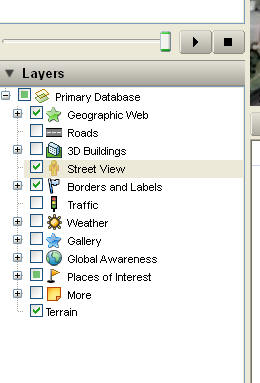
Google Earth - Fly Home (or to a favorite place)
Street View
***Homework for
Tuesday -
CLICK HERE for directions
Assignments
(also see right column on Home Page)
Hands on:
- Make Bookmark - check for
permissions in lab
- See link to 1blog on home page -
follow the directions for the blog entry and the email to the TA. Both must be
completed by the beginning of the next class in order to receive credit.
- "Fly" with Google Earth
- send location to yourself so you will have the URL
Outside of Class:
- Be familiar with information on
syllabus.
- Browse Computer Policies on
links shown on the homepage looking for answers to the Reading Hints at end of
class notes, below. The answers will not be turned in.
- Select a computer next class.
------------
Reading Hints:
- Be familiar with information on
syllabus.
- Code of Ethics for Computing
- Be aware of violations
- Relevant facts about copying software
- Section with questions and answers (be able to
answer the questions)
- Know the difference between shareware and public
domain software and copyright restrictions
- Code of Ethics for Electronic Mail and Voice Mail
- Section A. Be aware of violations in this
section.
- What are chain letters? You can get
information about chain letters and chain email from the Internet.
Logoff
- Close all applications
- Start=>Shut Down=>Log off
(choose this from pull down menu)