
Class 26 Notes are in progress and are subject to change
|
|
|
|
|
<Log On>
Discourse
Minimize Discourse
PicsThatLie Slide Show in Power Point
Changing the File Name of Your Home Page
Work in Class on Web Site - Q&A
Some things to check for:
HANDS-ON: Publishing Your Website on the Trinity Server
For safety, backup your Web in your shared folder onto your Y drive.
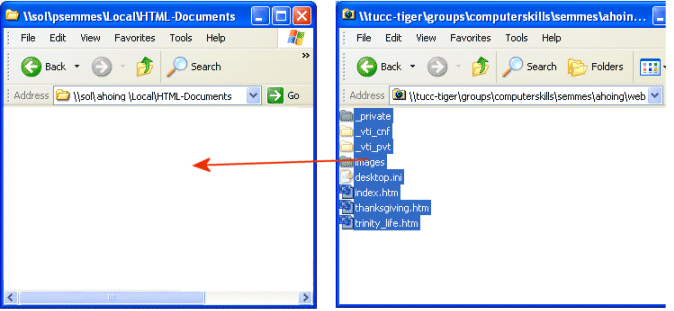
Open your HTML-Documents folder on Sol and copy and paste the folders and files from inside your Web folder (25myweb). The page named index.htm is your home page.
To open your HTML-Documents folder:
start >> run>> \\sol.cs.trinity.edu\userid\Local\HTML-Documents (substitute your own userid)
url: http://www.cs.trinity.edu/~userid
Publish Web on Sol and view Webs on Internet.
Check title that appears on title bar on each page.
Have someone else browse to your web and check for broken links and images.
Unpublish Web on Sol (if you ever need to):
Delete the files in your HTML-Documents folder in your Sol account.
Homework:
1. Make any corrections to your website that you feel necessary. They will not be fully evaluated until the end of class on Thursday.
2. Make a new blog entry about your site. Begin with this statement:
Please visit my website at www.cs.trinity.edu/~username (use your own username, of course).
Then address the following questions:
- Was making our site easier or harder than you thought?
- Which editor did you use? KompoZer? Expression Web? Hand code? Other?
- Which page or section are you most proud of and why?
- What would you have changed?
- What was your biggest technical challenge?
- What was your biggest design challenge?
- Who will you show your site to?
- Might you make another site for another class in the future?
<Log Off>