
Class 22 Notes are in progress and are subject to change
|
|
|
|
|
Class 22 Outline
Discourse
Minimize Discourse
Copy 22bones from Class to your shared folder. We will handcode the page first, and then we will use SeaMonkey for comparison.
Pics That Lie project dues - TA please check blogs for entries and then put the JPEG pic in a PPT photo album. Thanks
Preparing your digital portfolio/final website -
GUIDELINES
Purpose –
this site will showcase or promote something that you want to share with others.
It could be your writing, your artwork, your organization or yourself. It could
also be an extension of your PowerPoint presentation on a subject you believe
in. Here are some variations on themes:
Things you might want to include:
Saving a webpage in TextEdit on a Mac: Video
Download SeaMonkey from http://www.seamonkey-project.org/releases/ for Mac or Windows on your own computer
Optional:
Dreamweaver is on the computers in our lab - you might want to explore that
Introduction to HTML
Your review videos:
Rt. click inside 22bones - New>text document
Save file as bones.htm inside 22bones
(it is very important to change the file extension from .txt to .htm)
Open IE/Safari/Firefox and browse to file
Change, refresh, compare
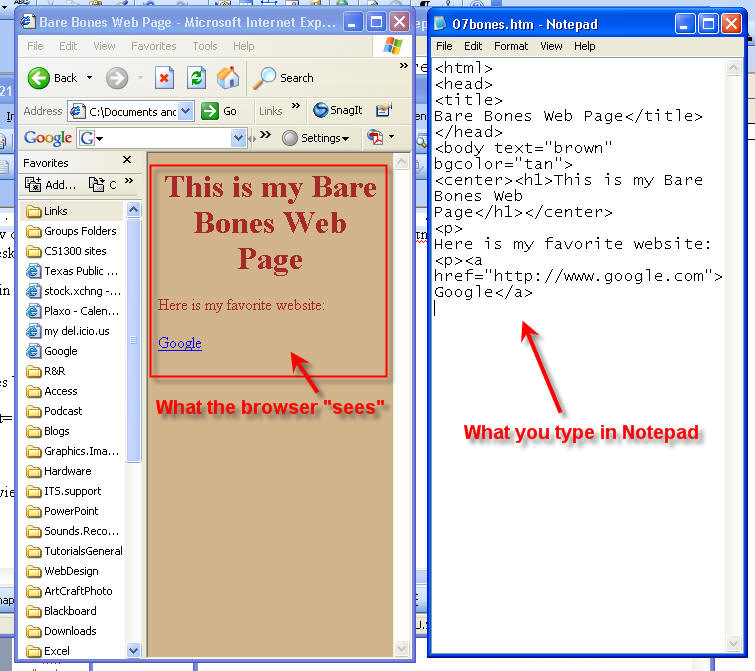
Bare Bones:
<html>
<head>
<title>
Bare Bones Web Page</title>
</head>
<body text="brown" bgcolor="tan">
<center><h1>This is my Bare Bones Web Page</h1></center>
<p>
Here is my favorite website:
<p>
<a href="http://www.google.com">Google</a>
<p>
<a href="http://www.trinity.edu">Trinity University</a>
<p>Here is a picture of my cat.
<p>
<IMG src="cat.jpg">
<p>
<ol>
<li>
Cat food</li>
<li>Fake mouse</li>
<li>Catnip</li></ol>
<p>
<table border=1>
<tr><td>One Fish</td><td>Two Fish</td><tr>
<td>
Red Fish</td><td>Blue Fish</td></tr>
Hexidecimal color basics for websites
Ordered Lists
Unordered Lists
There are 16 color names that you can use: aqua, black, blue, fuchsia, gray, green, lime, maroon, navy, olive, purple, red, silver, teal, white, and yellow. If you want to use other colors, you must specify their RGB or HEX value.
HTML tags that you should know how to use:
<html>...</html>
<head>...</head>
<title>...</title>
<body>...</body>
<p>...</p>
<br>
<b>...</b>
<i>...</i>
<center>...</center>
<u>...</u>
<b>...</b>
<h1>...</h1>
<h2>...</h2>
<h3>...</h3>
<h4>...</h4>
<h5>...</h5>
<h6>...</h6>
<hr>
<img src = "cat.jpg">
<a href="http://www.trinity.edu">Trinity University</a>.
<ul>
<li>...</li>
<li>...</li>
<li>...</li>
</ul>
use <ol> above in place of <ul> above
Know about table tags.
1. Practice your html
Add two new links to your bare bones page.
Change the background color.
Add one item to the list of things the cat likes.
Find another photo of a cat. Save it in the correct folder and insert it into your page using the correct html code.
Save and preview in browser.
2. Decide (tentatively) on the topic/theme for your Digital Portfolio. Be prepared to describe it in a discourse question on Thursday. Website Guidelines for your upcoming project
3. Short Blog Entry called Worst Website:
Go the Web Pages the Suck: Worst Websites of the Year. Look over the worst. Pick your favorite "worst site," tell why you chose it, and give the URL to that site.
http://www.webpagesthatsuck.com/worst-websites-of-the-year.html
<Log Off>