
Class 26 Notes are in progress and are subject to change
|
|
|
|
|
<Log On>
Discourse
Review Imagemaps
Important concept: You can make a webpage with many different programs - Dreamweaver, SeaMonkey, Expression Web - and you can go back and forth among them to suit your purposes. You can also hand-code inside or outside of these programs.
Movies and video: Windows Live Moviemaker
Demo: - follow directions in class to upload to YouTube
and also to save to computer.
EXTRAS:
Check you site before we publish
HANDS-ON: Publishing Your Website on the Trinity Server
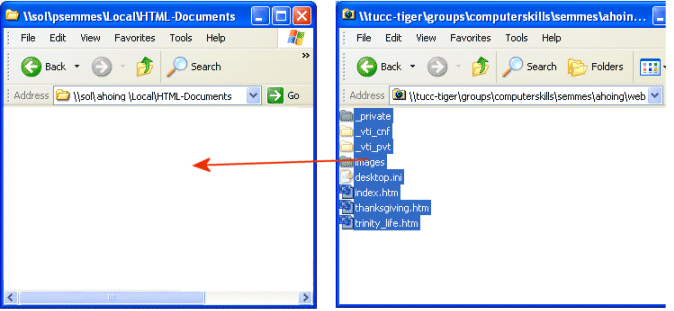
Open your HTML-Documents folder on Sol and copy and paste the folders and files from inside your Web folder (26myweb). The page named index.htm is your home page.
To open your HTML-Documents folder:
start >> run>> \\sol.cs.trinity.edu\userid\Local\HTML-Documents (substitute your own userid)
url: http://www.cs.trinity.edu/~userid
Publish Web on Sol and view Webs on Internet.
Check title that appears on title bar on each page.
Have someone else browse to your web and check for broken links and images.
Unpublish Web on Sol (if you ever need to):
Delete the files in your HTML-Documents folder in your Sol account.
1. Make at least one change or correction to your website that you feel necessary. Re-publish the page(s) with changes. Be prepared to show your site and write about what changes you made in Discourse on Thursday. They will not be fully evaluated until the end of class next Tuesday.
<Log Off>