
Class 27 Notes are in progress and are subject to change
|
|
|
|
|
<Log On>
Discourse
End-of-course assessment - last 15 minutes of class
Website Presentations and Final Ready-for-Prime-Time Tweaks
Check you site for the following:
HANDS-ON Review: Publishing Your Website on the Trinity Server
Open your HTML-Documents folder on Sol and copy and paste the folders and files from inside your Web folder (25myweb). The page named index.htm is your home page.
To open your HTML-Documents folder:
start >> run>> \\sol.cs.trinity.edu\userid\Local\HTML-Documents (substitute your own userid)
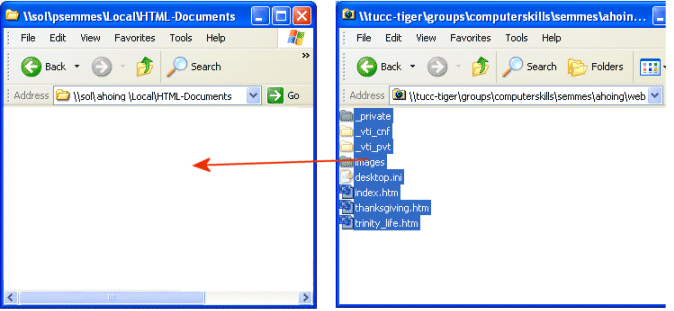
url: http://www.cs.trinity.edu/~userid
Publish Web on Sol and view Webs on Internet.
Check title that appears on title bar on each page.
Have someone else browse to your web and check for broken links and images.
Unpublish Web on Sol (if you ever need to):
Delete the files in your HTML-Documents folder in your Sol account.
1. Write an entry about your experience designing and publishing your website. The following are guidelines:
- Give your URL - start with "Please visit my site at www.cs.trinity.edu/~username" or something similar.
- Describe briefly your challenges and solutions.
- Name three sites that you like from those that your classmates presented and tell why you liked them both from the standpoint of content and technical skill.
2. Open the contacts worksheet in Excel in 27website. Add the information for five people, real or imaginary. Save it and close it- we will use this information in class on Tuesday.
<Log Off>