![[*]](http://www.cs.trinity.edu/Pictures/icons.gif/foot_motif.gif) computer is given, including processor and memory organization,
registers and instruction set.
computer is given, including processor and memory organization,
registers and instruction set.
John E. Howland
Department of Computer Science
Trinity University
715 Stadium Drive
San Antonio, Texas 78212-7200
Voice: (210) 736-7480
Fax: (210) 736-7477
E-mail: jhowland@Trinity.Edu
A description of the organization of the NIP
computer is given, including processor and memory organization,
registers and instruction set.
The NIP computer is a machine which has been used to teach undergraduates [Ster 70] certain computer science concepts of machine organization, machine language programming and assembly language programming. The NIP computer doesn't actually exist, but has been used, via a simulator, for instructional purposes. The purpose of this paper is to provide background information and NIP details for use in CS3194 as a third year design problem where student design teams will design and implement a NIP simulator and a NIP assembler.
The NIP memory system is an array of 8 bit bytes.
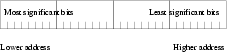
The maximum size memory a NIP machine can accommodate is 65536 bytes. The NIP memory is used to encode instructions and data which are stored as 32 bit values (4 consecutive bytes) aligned on addresses which are divisible by 4. All data values are maintained in 2's complement form and are stored in Big-Endian form, i.e., most significant digits are stored in smaller addresses while least significant digits are stored in larger addresses. Instructions which fetch operands from addresses which are not a multiple of 4 cause an addressing error to occur.
Figure 2 shows the organization of 2's complement data values when stored in memory.
The NIP memory system supports two memory operations. The access operation is a function of a single argument, the memory address, and returns the value of the specified memory location.
access(address)
The store operation is a function of two arguments, a data word and the memory address, and causes the data word to be copied to the specified memory address. The source data word is not altered by the copy operation, but the destination memory is replaced by a copy of the data word.
store(data,address)
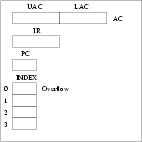
The NIP processor contains several internal memory cells. These internal memory locations are called registers and are located physically in the processor for efficiency reasons. Figure 3 shows the register configuration of the NIP processor.
The accumulator (AC) is a 64 bit register which is organized into two accessible 32 bit parts, UAC (most significant portion) and LAC (least significant portion). Two's complement arithmetic operations are performed in the UAC and LAC. Certain operations (multiplication and division) use the entire 64 bit AC as a single register.
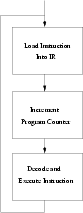
The instruction register (IR) is used to temporarily store each instruction which NIP executes. A NIP machine cycle consists of three distinct phases during the execution of each instruction. Figure 4 shows the stages of a NIP machine cycle.
The program counter (PC) holds the address of the next instruction which will be executed. It is ordinarily incremented by 4 during the processing of each machine cycle.
Since NIP instructions are stored in 32 bit words and must be aligned on addresses which are divisible by 4, the PC register is always incremented by four. The NIP computer generates an instruction error if an attempt is made to access an instruction from an address which is not divisible by four.
The NIP processor contains four sixteen bit index registers . Register 0 is reserved for use as an overflow register. Execution of each arithmetic instruction causes the register 0 to be set to 1 if an overflow of the 64 bit accumulator occurred. Otherwise, the normal execution of an arithmetic instruction causes register 0 to be set to zero.
The remaining index registers (1, 2 and 3) are used for indexing/counting operations and address calculations. See Section 4.5 for instructions which use index registers.
Each NIP instruction occupies a 32 bit (four byte) word which must be aligned on an address which is divisible by 4. The instruction format uses the first byte as an operation code, the second byte as an operation code modifier and the third and fourth bytes to store a memory address. Figure 5 gives the instruction format.
Certain instructions ignore either the M portion or the Address portion of the instruction. In this case, the ignored field may have any value. Other instructions may specify a particular range of values for the M portion. Execution of an instruction which contains an M portion whose value is outside the acceptable range causes an operation error .
It is assumed that the NIP computer has an operator console which contains a Start button which, when pressed, causes the following action

before starting a machine cycle. The NIP computer, of course, continues performing machine cycles until a HLT instruction is executed or an error occurs.
In the following sections, the layout of each instruction is shown in the format
OP M  Address
xx xx xxxx
The opcode and M portion values are given in hexadecimal notation.
OP M  Address
11 xx xxxx
The halt instruction causes the processor to stop. The M and Address portions of the instruction are ignored.
OP M  Address
20 xx xxxx
The read instruction causes the data word available at the input device
specified by the M portion of the instruction to be copied to the specified
memory address. The NIP computer currently supports input from device 0 only.
Input device 0 accepts input as an 8 digit hexadecimal number. No checking of
input values is done. If any of the 8 digits is not one of the characters
0123456789abcdef, then the input value is unspecified.
store(dataFromDeviceZero,address)
OP M  Address
21 xx xxxx
The write instruction causes the data word available at the specified memory address to be copied to the output device specified by the M portion of the instruction. The NIP computer currently supports output to device 1 only. Output device 1 prints each output, in hexadecimal notation, as an 8 character line.

The NIP computer contains a 64 bit accumulator (AC) which is subdivided into two 32 bit parts known as the upper accumulator (UAC) and the lower accumulator (LAC) as shown in Figure 6.
All arithmetic operations are performed using two's complement arithmetic and the
multiply and divide operations use the entire 64 bit accumulator.
OP M  Address
30 xx xxxx
The entire accumulator is cleared and then the contents of the specified memory location are added to either UAC (if M = 2) or LAC (if M = 1). The resulting sum replaces either UAC (if M = 2) or LAC (if M = 1). The NIP computer signals an invalid operation if any other values of M are used in a CLA instruction.



OP M  Address
31 xx xxxx
The entire accumulator is cleared and then the contents of the specified memory location are subtracted from either UAC (if M = 2) or LAC (if M = 1). The resulting difference replaces either UAC (if M = 2) or AC (if M = 1). Notice that the entire AC is affected (because two's complement arithmetic is used) when M = 1. The NIP computer signals an invalid operation if any other values of M are used in a CLS instruction.


OP M  Address
32 xx xxxx
Transfer the contents of the LAC (if M = 1) or UAC (if M = 2) to the location given by the Address portion of the instruction.
if M = 1
store(LAC,address)
if M = 2store(UAC,address)
OP M  Address
40 xx xxxx
The contents of the word in the specified memory address are added to either UAC (if M = 2) or LAC (if M = 1).
if M = 1
OP M  Address
41 xx xxxx
The contents of the word in the specified memory address are subtracted from either UAC (if M = 2) or LAC (if M = 1).
if M = 1

OP M  Address
50 xx xxxx
The contents of LAC are multiplied by the contents of the specified memory location and the resulting product is stored in the entire accumulator.

The M portion of this instruction is ignored.
OP M  Address
51 xx xxxx
The contents of the entire AC are divided by the contents of the specified memory location. The division is an exact integer division producing the quotient in LAC and the remainder in UAC. The M portion of the DIV instruction is not used. The sign of the remainder is equal to the sign of the dividend except that a zero remainder and a zero quotient are always positive.
If the divisor is zero, a division error occurs.


OP M  Address
60 -- xxxx
The sequential execution of instructions is altered. The next instruction performed is that whose location is given in the address portion of the instruction. The M portion of this instruction is not used.

OP M  Address
61 xx xxxx
This instruction tests LAC (if M = 1) or UAC (if M = 2). If it is not zero, the next sequential instruction is executed. If the contents of the indicated part of the AC are zero, then the next instruction is taken from the address given in the instruction.
if M = 1 and LAC = 0 or
OP M  Address
65 -- xxxx
The overflow register (Index Register 0) is set to 1 if an arithmetic instruction results in an accumulator overflow. Otherwise, the overflow register is set to zero after execution of arithmetic instructions. If the contents of the overflow register is one, then the next instruction is taken from the address given in the instruction. Otherwise, the next sequential instruction is executed.
if Overflow register = 1
OP M  Address
62 xx xxxx
The low order 8 bits of the AC are compared to the M portion of the instruction. If the values are identical, then the next instruction is taken from the address given in the instruction. Otherwise, the next sequential instruction is executed.
if M = least 8 bits of AC
OP M  Address
70 xx xxxx
The least significant 16 bits of the LAC or of a designated word in memory are added to the register indicated by the M portion of the instruction. The Address portion of the instruction specifies the word in memory unless the address is zero, in which case, the least significant 16 bits of the LAC is added to the specified index register.
if Address = 0


Since the index registers are 16 bit registers, only the least significant 16 bits of the LAC or access(address) are added.
OP M  Address
71 xx xxxx
The contents of the index register specified in the M portion of the instruction are added to the contents of the address portion of the instruction or, if the address portion of the instruction is zero, the contents of the index register is added to the LAC.
if Address = 0

store(IndexRegister M + access(address),address)
OP M  Address
72 xx xxxx
The contents of the index register specified in the M portion of the instruction are set to the value of the address portion of the instruction.

OP M  Address
74 xx xxxx
The value of the address portion of the instruction is added to the contents of the index register specified in the M portion of the instruction.

OP M  Address
75 xx xxxx
The value of the address portion of the instruction is subtracted from the contents of the index register specified in the M portion of the instruction.

OP M  Address
76 xx xxxx
If the contents of the index register specified in the M portion of the instruction are zero, then the next instruction to be executed is taken from contents of the address. Otherwise, the next sequential instruction is executed.
if IndexRegister M = 0

Indirect addressing refers to the use of the contents of a location as the address of an operand.
OP M  Address
44 xx xxxx
The contents of of the word whose location is is given by the least 16 bits of the word whose address is specified by the Address portion of the instruction are added to either the UAC (if M = 2) or LAC (if M = 1)
if M = 1


OP M  Address
78 xx ----
The location of the next instruction to be loaded into the instruction register (IR) is found in the index register given by the M portion of the instruction. The Address portion of this instruction is not used.

The NIP assembly language converts symbolic NIP machine instructions into a binary format suitable for loading into a NIP computer for execution.
In Section 4, the NIP machine console start button is described. When pressed, the start button causes the program counter to be set to zero before starting a machine cycle. This means that the assembler output should assume that programs are to be loaded into memory beginning at location 0.
The NIP assembler format is line oriented, having one NIP symbolic instruction or one NIP assembler directive per line. The format of each line is flexible, allowing one or more consecutive spaces and/or tabs as separators of each of the fields in each instruction. The fields are (in order):
The Label field is optional and would appear in a NIP assembler line only if that line needs to be referenced by another NIP assembler instruction. If a label is used on a NIP assembler instruction, then the label must begin in the first character of the input line. If the first character of the line is space or tab, then the NIP assembler assumes that the line does not contain a label and the next field in the line (after scanning over any adjacent spaces or tabs) is the operation field.
The operation field consists of the symbolic name of the NIP machine instruction or NIP assembler directive in capital letters, such as HLT, CLS, ADD or DC. Some NIP machine instructions have an M portion which is actually a modifier portion of the instruction. If the M portion of an instruction appears, then it must immediately follow the operation field and be separated from the operation field by a single comma. If the M portion does not appear in the instruction, then the comma must not appear as well.
The comment field may contain any characters (including spaces and tabs) and continues until the end of the line.
[label] DS integer-constant
The DS assembler directive reserves integer-constant bytes beginning
at the current location. The optional label, if present, defines a symbol
which may be used to refer to the beginning of this area. The storage area
is not initialized.
[label] DC hex-constant
The DC assembler directive reserves a single word of memory beginning at the
current location which is initialized to the value hex-constant. The
hex-constant is an 8 digit hex-decimal value where the digits are
chosen from the characters 0123456789abcdef. The optional label,
if present, defines a symbol
which may be used to refer to the beginning of this word.
Since DC generates a single word of memory, the location of the constant is
the first address following the current location which is divisible by 4 if
the current location is not divisible by 4.
[label]