Class 23 Notes are in progress and are subject to change
|
|
|
|
|
<Log On>
Discourse
Minimize Discourse
Copy 23webplan from Class to Groups
In your Groups folder, right-click and create an empty folder called 26myweb. This will be where you create your own site.
Review postcards, bones homework
Download Expression Web (Windows only) from the Microsoft folder in the S Drive and/or download KompoZer for Mac or Windows - it's free.
S:\Microsoft\Expression Web
Continue HTML:
Open the bare bones webpage we started in class on Tuesday (hint: right click on the file in your folder and go to Open With>Notepad)
Webpage colors using hexadecimal codes.
<BODY BGCOLOR="#D8BFD8">
When you create a graphic for the web, you choose your colors based upon their RGB values. However, HTML will only recognize a color by its hexadecimal equivalent of the RGB values or by its color name, if it has one. Even though most HTML editors and graphics programs have RGB to hexadecimal conversion capability built into them, it might still be helpful to know how it works.
Hexadecimal numbering system: 0 1 2 3 4 5 6 7 8 9 A B C D E F
Colors (web safe) are specified by 00 33 66 99 CC FF - example, #3300CC
Hexadecimal colors - a quick explanation
Change the background color and
the text using Hexadecimal numbers - a few examples.
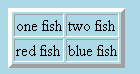
Creating Tables: Create a 2X2 table using HTML code on your bones page
from Tuesday.
<table border=4><tr><td>one fish</td><td>two fish</td></tr><tr><td>red fish</td><td>blue fish</td></tr></table>
Save the file
Great Web Design (using tables effectively)

Student examples from last semester -
For today's class, however, we will create a practice website inside 23webplan called practiceweb.
Key West Practice Site
Hint: if you print out (or just refer to) these tutorials, you will have no trouble making your website
Do you find the floating letters and the green rollovers annoying?
Web Design Guidelines (webtips in infopages)
Iconbazaar (For good or evil)
http://www.cs.trinity.edu/~jbelisle/cs1300/08SpTutorials/miracleweb.htm
Imaginative Design:
http://www.cs.trinity.edu/~sjackso1/index.htm
Good example of non-personal informational site:
http://www.cs.trinity.edu/~kmorris/index.htm
Homework
Part 1
Make a short blog entry about why it is important for web designers to be able to know and use HTML code even if sophisticated web-authoring software such as Expression Web or KompoZer is available.
Part 2
Use the MS Word document inside 23webplan to make a thumbnail plan for the content and navigation of your website - you may use the drawing tools (arrows, etc.) to show how it will al work together. When you have finished save your webplan homework in the same place inside 23webplan. If you would rather sketch your plan, that's fine, but you will need to scan it and then make sure it's copied into the folder.
AND >>>>>>Work on your Pictures that Lie manipulated photograph and blog analysis entry!! Don't for get to include a citation to an article on fake photos.
<log off>